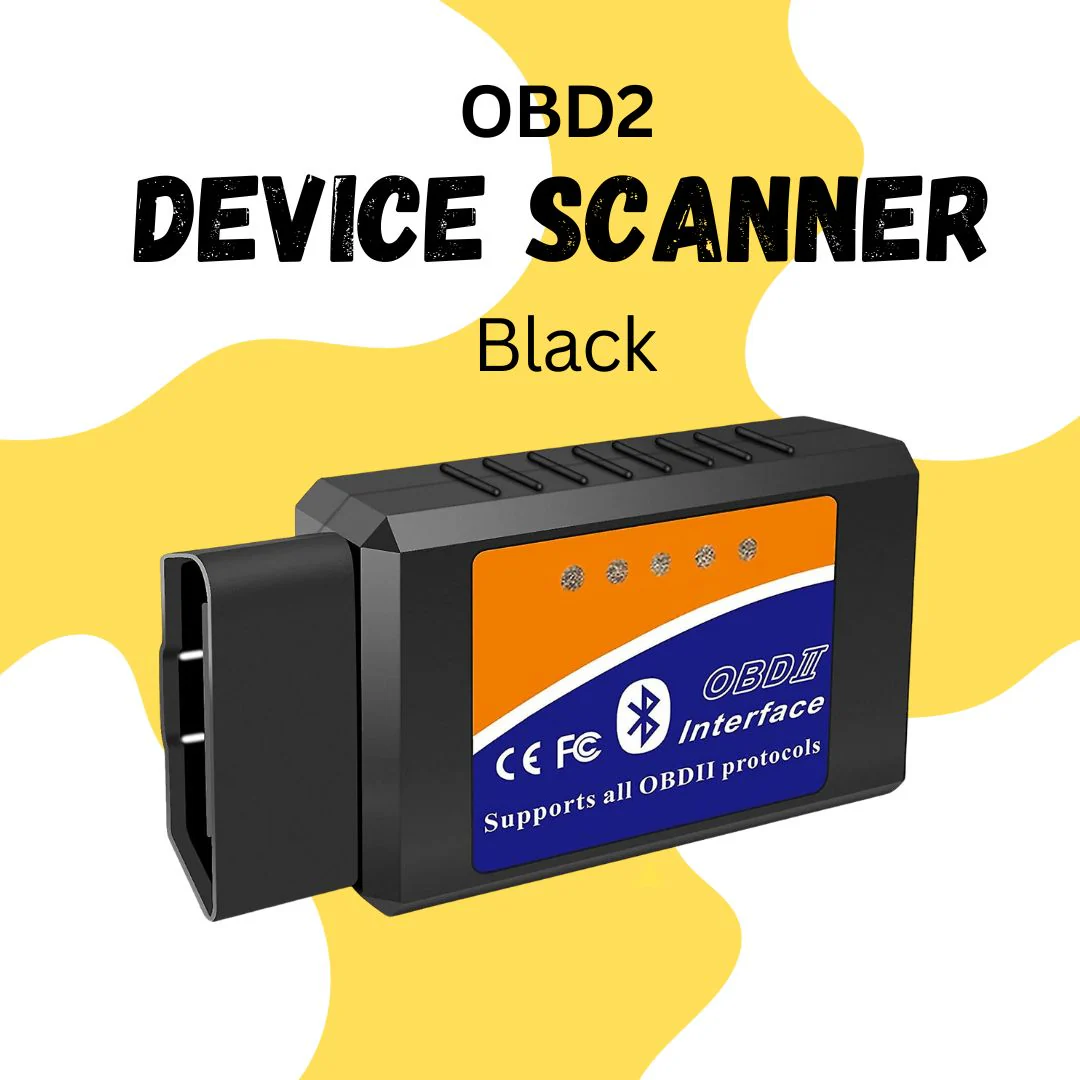
A modern car can tell you a lot before a dashboard light ever appears. With the right tool, you can read trouble codes, check live sensor data, and understand what your vehicle is doing in real time. That is exactly why Obd2 scanner bluetooth for android devices have become so popular for drivers, home mechanics, and small garages. On-board diagnostics provide access to standardized data and trouble codes through the vehicle’s diagnostic system, which is why these scanners can be so practical for everyday use.
Instead of guessing, you can connect a compact Bluetooth adapter to the OBD2 port, open an Android app, and see information that once required more expensive equipment. Many Bluetooth OBD2 tools support Android phones and can display current sensor data, read codes, and clear codes for OBD-II compliant vehicles.
For anyone who wants a smarter way to understand vehicle health, Obd2 scanner bluetooth for android is one of the simplest and most useful tech upgrades available. This guide explains what it is, how it works, what to look for, and how to choose a reliable unit without wasting money.
What a Bluetooth OBD2 Scanner Actually Does
An OBD2 scanner is a diagnostic tool that reads data from a vehicle’s onboard computer. The Bluetooth version sends that data wirelessly to your Android device, so you do not need a screen built into the scanner itself. That makes the tool smaller, lighter, and easier to carry.
The main job of the scanner is to talk to the car’s diagnostic system and fetch information such as engine speed, coolant temperature, throttle position, and emissions-related trouble codes. The OBD-II standard supports many basic data points, including current engine data and stored diagnostic trouble codes, which is why so many apps can display similar readings across different cars.
A good Obd2 scanner bluetooth for android setup usually has two parts:
- A Bluetooth adapter that plugs into the car’s OBD2 port.
- An Android app that reads, organizes, and displays the information.
Together, they turn your phone into a diagnostic window for the vehicle. That is useful when a check-engine light appears, but it is also useful for monitoring a car before a long trip, checking fuel-system behavior, or confirming whether a repair actually solved the issue.
Why Android Users Prefer Bluetooth Scanners
Android users often prefer Bluetooth scanners because they are flexible and affordable. You can choose from different apps, different display styles, and different feature sets depending on how deep you want to go. Some apps focus on simple code reading, while others provide dashboards, live graphs, trip tracking, and readiness monitors.
The mobile experience also feels familiar. Most people already know how to install an app, pair a device, and read a dashboard-style screen on a phone. With the right app, the learning curve is much lower than with older handheld scanners.
Another reason Android is a strong match is customization. You can install one app for quick scans, another for detailed data logging, and another for a specific vehicle brand. That flexibility makes Obd2 scanner bluetooth for android a practical choice for both beginners and advanced users.
How the Connection Works
The process is simple once you break it down.
The scanner plugs into the vehicle’s OBD2 port, which is usually located under the dashboard on the driver’s side. After that, the adapter communicates wirelessly with your Android phone over Bluetooth. The app sends requests to the vehicle computer and receives the answers through the adapter.
A useful part of this system is that the vehicle can respond with standardized data. The OBD-II framework includes common diagnostic requests, so many scanners can read similar core information across different models. That is why live engine speed, temperature readings, and certain readiness checks are so commonly available.
A well-made Obd2 scanner bluetooth for android tool does not just show random numbers. It translates vehicle data into something readable, so the driver can understand whether the car is running normally or whether a fault needs attention.
Standard Data You May See
An Android app can display many useful items, including:
- Engine RPM
- Coolant temperature
- Intake air temperature
- Fuel trim values
- Throttle position
- Vehicle speed
- Battery or control-module voltage
- Emissions readiness status
- Stored trouble codes and pending trouble codes
These data points are commonly associated with OBD-II live monitoring and standardized PID readings.
Key Features to Look For Before Buying
Not every scanner is equally useful. Some are basic code readers, while others are much more capable. Before buying, focus on features that match your car and your needs.
1. Android App Compatibility
This is the first thing to confirm. Some adapters work with only certain apps. Others are more universal. Look for clear support for Android phones and tablets, because pairing issues can be frustrating if the device is not well supported.
2. Live Data Support
Live data is one of the most valuable features. It lets you see readings while the engine is running, which helps you understand how the vehicle behaves under different conditions. This can be especially helpful when diagnosing rough idle, overheating concerns, or fuel-related irregularities.
3. Trouble Code Reading and Clearing
A scanner should be able to read diagnostic trouble codes and clear them after a repair. Many Bluetooth OBD2 scanners marketed for Android mention these functions directly, along with current sensor data support.
4. App Quality
The adapter matters, but the app matters just as much. A clean app with easy-to-read graphs, clear labels, and stable Bluetooth pairing can make a big difference. Poor software can make a capable scanner feel frustrating.
5. Vehicle Compatibility
Most OBD2 scanners work with vehicles that follow the OBD-II standard, but compatibility is still worth checking. Some cars have more advanced functions than others. A basic reader may be enough for one driver, while another may need deeper system access.
6. Build Quality
A small adapter gets plugged in and removed repeatedly, so build quality matters. A loose connector or weak casing can shorten the device’s life. A stable device also tends to pair better and remain connected longer.
7. Extra Features
Some tools include freeze-frame data, emissions readiness checks, graphing, export options, or brand-specific diagnostics. Higher-end units may also work with wider vehicle coverage or advanced functions. Android-based diagnostic tablets and Bluetooth-connected devices are common in more capable systems.
How to Set It Up on an Android Phone
Setting up Obd2 scanner bluetooth for android equipment is usually straightforward, but doing it in the right order prevents common problems.
Step 1: Find the OBD2 Port
Most passenger vehicles have the port under the dash, near the steering wheel area. It is usually easy to reach without tools.
Step 2: Plug in the Adapter
Insert the Bluetooth adapter firmly. Some units draw power immediately, while others activate when the ignition is on.
Step 3: Turn the Ignition On
Many scanners need the vehicle in accessory mode or fully on before they can communicate properly. You do not always need to start the engine, but the ignition usually has to be active.
Step 4: Pair the Device
Open Bluetooth settings on your Android phone and search for the adapter. Some units use a PIN code such as 1234 or 0000, depending on the model.
Step 5: Open the Diagnostic App
Launch the app that came with the scanner or a compatible third-party app. Choose the Bluetooth device from the connection list and wait for it to establish communication.
Step 6: Run a Basic Scan
Start with a simple read of current codes or live data. That confirms the adapter is working and gives you a first look at vehicle status.
Step 7: Save or Record the Data
If the app allows it, save screenshots or logs. This can help later if you are comparing readings after a repair.
A properly configured Obd2 scanner bluetooth for android setup should connect smoothly and stay stable during normal use. If it keeps dropping, the issue is usually app-related, power-related, or compatibility-related rather than the idea of Bluetooth itself.
How to Read the Results Without Getting Confused
The first time you open a scanner app, the data can look intimidating. Numbers, abbreviations, and graphs can feel technical at first. The trick is to focus on the basics.
Trouble Codes
A trouble code usually tells you which system is unhappy. Some codes relate to emissions, some to sensors, and some to misfires or fuel-control issues. A code is not always the final answer, but it is a very useful starting point.
Live Data
Live data tells you what the engine is doing right now. For example, if coolant temperature climbs too high, that may point toward a cooling issue. If fuel trim values are unusually far from normal, that may suggest an air-fuel imbalance or a sensor issue.
Readiness Monitors
Readiness monitors help show whether the car has completed certain self-checks. This is useful after repairs or after clearing codes, because it tells you whether the vehicle has had enough driving time to test key systems again.
The important point is to compare data with the way the vehicle actually behaves. A scanner is a guide, not a magic answer. The better you understand the readings, the more useful the tool becomes.
Common Mistakes to Avoid
A lot of scanner problems are not caused by the car. They are caused by simple setup mistakes.
Buying the Cheapest Unknown Adapter
Very cheap adapters may look attractive, but poor connection quality and weak app support can ruin the experience. A slightly better-built unit often saves time and frustration.
Ignoring App Permissions
Some Android apps need Bluetooth, location, or other permissions to work correctly. If the app cannot detect the adapter, check permissions before assuming the scanner is faulty.
Using the Wrong App
Not every adapter works with every app. Before blaming the device, confirm that the scanner and app are known to work together.
Expecting Every Vehicle to Offer the Same Data
Some vehicles provide richer diagnostics than others. A scanner can only show what the car supports. That is normal.
Geekzilla T3: Ultimate Hub for Tech Enthusiasts — a broad tech-focused resource that covers Android ecosystem updates and general technology trends.
Clearing Codes Without Investigating the Cause
Clearing a trouble code may turn off a warning light, but it does not fix the underlying issue. Always check the reason behind the code first.
Best Uses for Daily Drivers
A Bluetooth scanner is not only for emergencies. It can be useful in everyday ownership.
Before a Long Trip
You can check for stored codes, review temperature readings, and confirm that no warning signs are hiding behind a clean dashboard.
After a Repair
If a mechanic replaced a sensor or fixed an engine issue, the scanner helps confirm whether the repair changed the readings in the right direction.
Which Course Is Best After BSc Computer Science — a technology-pathway article that also mentions mobile and app development.
For Used-Car Checks
When looking at a used vehicle, a quick scan can reveal stored trouble codes or readiness issues that may not be obvious during a short test drive.
For Learning
Many car owners simply enjoy understanding their vehicle better. Watching live data on an Android phone makes the car feel less mysterious and more manageable.
A reliable Obd2 scanner bluetooth for android device is especially helpful in these situations because it gives quick feedback without requiring a full workshop setup.
What Makes a Good App Experience
The app can make the difference between a tool you enjoy and one you stop using.
A good app should:
- Pair quickly
- Show data clearly
- Let you save readings
- Offer simple code explanations
- Handle live graphs smoothly
- Avoid constant disconnects
Some apps are built for basic users, while others are closer to professional diagnostic software. If you are just starting out, choose something that explains codes in plain language and offers a clear layout.
How to Fix Slow WiFi on iPhone in 2026 — a practical device-help article that shows the site’s style for step-by-step troubleshooting content.
More advanced users may want graphing tools, custom dashboards, or brand-specific functions. In that case, the scanner should match the depth of the app you plan to use.
Safety and Practical Care Tips
Even though the tool is simple, a few habits can help it last longer.
Keep the adapter stored safely when not in use. Avoid leaving it plugged in for long periods if it drains the battery in your specific vehicle. Use the app responsibly while the car is parked, especially if you are learning how data changes at idle or during a short drive.
Also, remember that diagnosis is about patterns, not just one number. Compare readings over time. That habit gives you a better picture of vehicle health than a single snapshot.
Related Keywords You Should Know
This topic naturally connects with several useful phrases that often appear in product searches and guide articles:
car diagnostic tool, engine code reader, Bluetooth OBD adapter, live data monitor, vehicle scan tool, fault code reader, OBD-II adapter, Android diagnostic app, emissions readiness, and trouble code scanner.
These terms are closely connected to Obd2 scanner bluetooth for android and help narrow a search when looking for a specific function or device style.
For a neutral background overview of vehicle diagnostics, see On-board diagnostics on Wikipedia. It explains the purpose of OBD systems and how they provide standardized vehicle data.
Why This Tool Is Worth Having
A Bluetooth OBD2 scanner is one of those devices that pays off in knowledge as much as it pays off in convenience. You do not need to be a professional technician to benefit from it. With the right app and a compatible adapter, you can check engine data, watch live readings, and get a better sense of what your car is doing.
That makes Obd2 scanner bluetooth for android a practical choice for drivers who want more control, more clarity, and less guesswork. It is compact, easy to use, and flexible enough to fit different levels of experience.
If you maintain your own car, shop smart, or simply like understanding how things work, this tool can become a regular part of your driving routine. And once you learn how to read the data, the dashboard light becomes only the starting point, not the whole story.
Conclusion
The best scanner is not always the one with the longest feature list. It is the one that matches your vehicle, your Android phone, and the level of detail you actually need. Start with a trustworthy adapter, pair it with a good app, and learn the basics of live data and code reading.
